70s Retro KDP Composition Notebook Cover
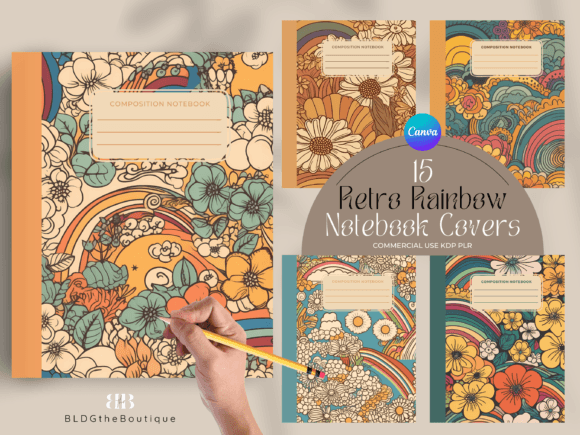
There is something undeniably magnetic about the shapes and tones of the 1970s. That earthy warmth, the gentle optimism in a field of wildflowers, and the unfussy structure of a classic composition notebook all collide in a bundle built for today’s independent publisher. When you open these 70s Retro KDP Composition Notebook Cover templates, you are not just picking up four vintage wildflower designs — you are grabbing a ready-to-customize system that helps you create low-content books that feel intentional, nostalgic, and completely sellable.
Inside this package you get 15 Canva templates that include front and back covers formatted for a 7.5″ x 9.25″ notebook (110 pages, full spread size 15.498″ x 9.5″), editable label colors, adjustable spine typography, and full commercial resell rights. The designs draw from a warm, 70s wildflower palette — mustard yellows, terracotta reds, dusty greens, and faded denim blues — combined with retro label badges and that iconic black composition notebook spine. Whether you are a seasoned KDP seller or someone testing their first low-content book, this collection gives you the creative bones to move fast and still produce work that feels handcrafted.
Why the 70s Wildflower Look Connects With Buyers
Nostalgia sells, but it works best when it feels genuine rather than forced. The 70s retro aesthetic sits in a sweet spot: it appeals to older shoppers who remember the era fondly, and to younger audiences drawn to its analog warmth and Instagram-friendly charm. A notebook cover that weaves wildflowers with a composition book layout evokes simpler times — journaling on a porch, pressing flowers between pages, sketching ideas in a coffee shop. This emotional layer turns a plain notebook into a keepsake.
The 70s Retro KDP Composition Notebook Cover set leans into this with floral illustrations that feel slightly faded, as if plucked from a well-loved field guide. When you use these templates, you are not just slapping a graphic onto a cover. You are offering your buyer a mood. And on platforms like Amazon KDP, where shoppers scroll through hundreds of identical black-and-white marble notebooks, that mood becomes your differentiator.
Customizing Colors and Fonts to Speak to Your Niche
One of the strongest features of this bundle is the flexibility baked into the Canva files. You can change the label color on the front cover, recolor the spine text, and resize the entire template without losing quality. That means a single design can serve multiple audiences just by shifting a few elements. Think about how a soft lavender label and a sans-serif font transforms the same wildflower cover into something that appeals to bullet journal enthusiasts. Swap in a deep forest green and a serif typeface, and suddenly you have a nature journal that resonates with hikers and outdoor educators.
Small adjustments like these allow you to create a cohesive product line under one brand while keeping each variation distinct. Many KDP sellers make the mistake of using the same exact cover for every niche. With these editable templates, you can spin off a gratitude journal, a gardening log, a poetry notebook, or a daily planner — each with its own subtle personality — while maintaining that unified 70s retro composition notebook charm.
Design Variations That Keep Your Catalog Fresh
Even with four base covers, you have far more than four products. By treating each template as a canvas for experimentation, you can produce multiple variations that stop the scroll. Try these approaches to stretch the creative potential of the 70s Retro KDP Composition Notebook Cover pack:
- Seasonal Remixes: Shift the wildflower colors to suggest autumn (deep rusts, golds) or spring (blush pinks, butter yellows). Keep the composition book frame intact so the retro identity stays strong.
- Minimalist Takes: Remove some floral elements or lower their opacity for a ghosted effect. Pair with a clean, modern script for the label — this attracts buyers who love vintage but prefer understated design.
- Maximalist Collage: Duplicate floral motifs, play with layering, and add subtle textures like paper grain or linen. The result feels like a curated antique store find, perfect for junk journaling or mixed-media communities.
- Monochrome Editions: Convert the entire cover to sepia or a single hue for a unified look. This works beautifully for writing journals aimed at authors who want a distraction-free, elegant exterior.
Resizing the templates also opens doors to other formats — a square 8.5″ x 8.5″ sketchbook or a larger 8.5″ x 11″ workbook can use the same wildflower composition design with minor adjustments, giving you more ways to fill a storefront.
Practical Steps From Canva to a Live KDP Listing
Templates only matter if the transition to print is smooth. The good news: these Canva files are already formatted for a 110-page, 7.5″ x 9.25″ notebook. Exporting them as PDFs for KDP follows an easy workflow. After you have customized the label, spine, and any floral elements, download a PDF Print file with the bleed settings that match the provided dimensions. In Canva, you will use the “PDF Print” option and ensure that “crop marks and bleed” is checked if KDP’s cover creator requires it — though the template dimensions already account for the full spread.
A few real-world tips to keep your end product clean:
- Always double-check that your spine text remains centered and within the safe zone after editing. Even a small shift can look off-center on a physical book.
- If you change the label color, confirm the contrast ratio against any text on that label remains high — low-contrast combos may look moody on screen but turn illegible in print.
- Use the same export settings for the front and back covers to keep color consistency. Variations in CMYK conversion can cause subtle mismatches between the two sides.
Because the templates come with commercial use rights, you are free to sell the finished notebooks without any extra attribution or fees. That clarity lets you focus entirely on design and marketing without worrying about licensing loopholes.
Who Uses These Templates and How They Adapt Them
Different creators bring different goals to the same asset. A freelance graphic designer might use the 70s Retro KDP Composition Notebook Cover bundle as a starter kit for a client’s product line, customizing each cover to align with a wellness brand’s visual identity. A teacher with a side hustle might create gratitude journals for her students, recoloring the wildflowers to match school colors and adding a class name to the label. A blogger who writes about slow living might craft a set of recipe notebooks, pairing one cover with a kitchen-themed title and leaving the floral design mostly untouched to keep that cozy, homestead feel.
The adaptability extends beyond just the cover. Because you can easily duplicate the Canva file, you can build multiple product mockups for Etsy, Pinterest, or your own website. Use a single template to show how the notebook looks in different colorways, helping customers visualize their choice. This kind of visual marketing becomes effortless when the base design is already strong.
Originality Within a Proven Format
A concern some sellers voice is whether pre-made templates lead to sameness. But the composition notebook format itself is a classic — it is the recognizable black spine and label arrangement that people love. The wildflowers and 70s color palette bring distinctiveness. Your job is to push that distinctiveness further. Instead of settling for the default label text “Composition Book,” type something that intrigues: “Field Notes & Daydreams,” “Wildflower Thoughts,” or “1973 Drafts.” These small text changes transform the product’s context without altering the core appeal.
Additionally, consider pairing your cover designs with intentionally crafted interiors. The bundle gives you the cover; the inside is your playground. For a nature journal, add lightly lined pages with occasional tiny floral corner illustrations. For a mood tracker, dot grid pages with a subtle 70s color palette. The cover sets the promise, and the interior delivers on it — a combination that builds repeat buyers who trust your brand.
Marketing Covers That Feel Handpicked, Not Mass-Produced
When you publish a notebook using these templates, you are competing in a busy marketplace. Let the 70s retro wildflower theme guide your product descriptions, keywords, and promotional images. Mention “vintage composition notebook,” “retro flower journal,” “70s aesthetic notebook,” and “gift for nature lovers” in your listing. Use lifestyle imagery: place a printed copy on a wooden desk next to a dried flower bundle and a fountain pen. That visual connection helps shoppers imagine owning the item, making the purchase emotional rather than purely functional.
You can also bundle the notebooks as a set — perhaps a trilogy of “Spring Wildflowers,” “Summer Meadow,” and “Autumn Blooms” composition books sold as a series. Since the base template remains consistent, the collection feels cohesive and collectible, encouraging buyers to add all three to their cart.
Staying True to the Era Without Feeling Dated
Retro design walks a fine line. Too literal, and it feels costume-like; too muted, and it loses its character. The wildflower illustrations in this pack sit in a balanced zone — they recall seed packet art and vintage botanical prints without using harsh, psychedelic clichés. Your edits should follow that lead. If you add extra graphic elements, keep them analog-inspired: subtle halftone dots, slightly rounded corners, or typewriter-style fonts. Avoid futuristic gradients or overly digital glows. This restraint helps your notebook appeal to a broad age range — from a 50-something remembering her mother’s garden to a 22-year-old exploring analog journaling on TikTok.
Maintaining that cohesive retro soul across your product line builds a recognizable brand. Even if a customer sees only your cover thumbnail in search results, they will start to associate that warm, wildflower composition style with quality. Over time, that consistency earns click-throughs and positive reviews.
Quick Wins for Experienced Sellers and Beginners Alike
If you have been selling on KDP for a while, these templates can help you test a new niche without commissioning custom art. Launch two or three variations in a weekend, see which title and color combo gains traction, then scale the winner with more interiors. If you are completely new, the pre-formatted spread removes the most intimidating technical hurdle — getting the cover dimensions correct. You can open the Canva file, tweak a label, and be ready to upload in an hour.
The included .txt file with the Canva link keeps everything simple. Create a free Canva account, open the template, and immediately start playing. No complex software, no layering woes. The resizable nature lets you also repurpose the design for other print-on-demand products — think spiral-bound notebooks, sketch pads, or even lined notepads — expanding your reach without additional investment.
Building a Thoughtful Product Line Around One Strong Theme
The 70s Retro KDP Composition Notebook Cover collection invites you to build more than a single book. You can craft a small ecosystem: a journal, a planner, a logbook, and a sketchbook, each with a slightly different interior but bound by the same nostalgic wildflower cover thread. This approach increases the lifetime value of each customer and gives your store a curated, boutique feel.
Because the label and spine text are editable, you can easily version the same cover for different purposes — “Herb Garden Log,” “Meditation Notes,” “Songwriting Notebook” — while keeping the floral composition structure intact. The result is a product line that feels cohesive rather than repetitive, and a workflow that saves you hours of design time on each new listing. Ultimately, that blend of efficiency and charm is exactly what makes a pre-made cover bundle not just a shortcut, but a genuine creative springboard.